

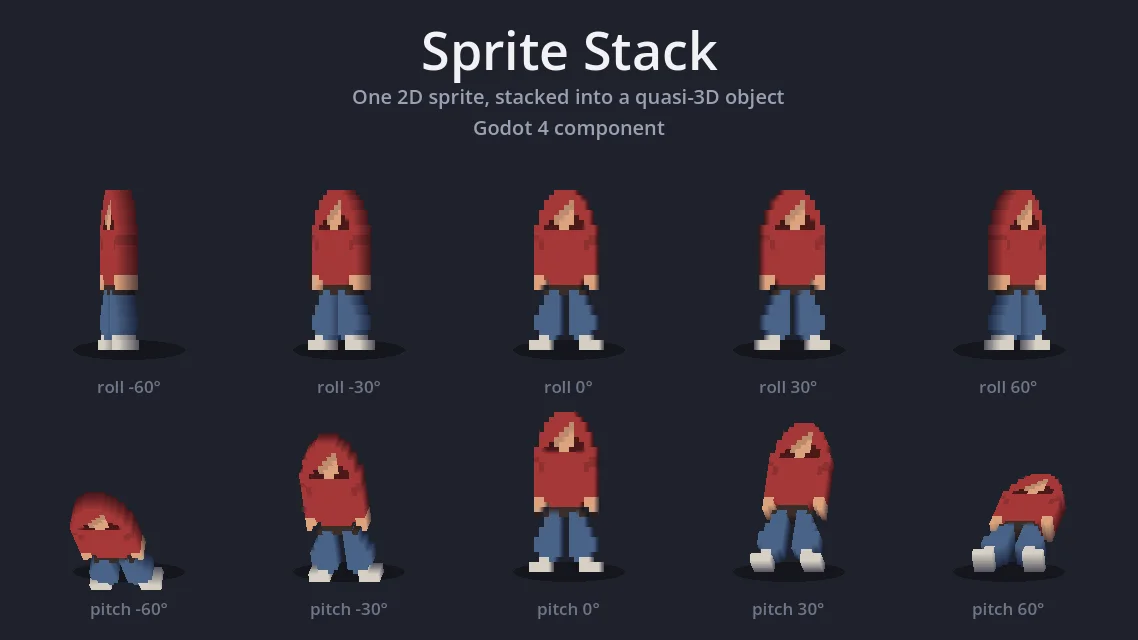
2D sprite stacking
Type: 2DSingle component to stack sprites into quasi 3D models without needing to add a 3DViewport. ## AI warning. Needed to use AI to handle side views (still is shanky) and gap filling.
Setup
- Add a sprite/SpriteSheet as texture.
- Slice if needed.
- Set Stack direction if needed. (defaults to bottom -> up)
- Set amount of layers and spacing between layers.
- Optional: If you are gonna rotate the sprite in game i recommend setting the view angle at 0 so it only depends on rotation.
- Optional: Change shading if you have lights on your scene that will not match.
Code
Released under CC0 1.0 licence (opens in a new tab): use, change and share it in any project, without asking and without giving credit.
GDScript
@tool
class_name SpriteStack
extends Node2D
## Draws a sprite as a stack of slices for a pseudo-3D look. By default the stack
## rises toward the top of the screen, however the node or camera is rotated.
## Slices are read left to right, then top to bottom. To extrude a single sprite,
## leave [member slice_size] at zero and increase [member layers_per_slice].
## Spin it with the node's rotation and tip it over with [member pitch] and [member roll].
## For pixel art, use nearest-neighbour texture filtering.

enum SliceOrder {
	## The first slice in the sheet is the bottom of the object.
	BOTTOM_FIRST,
	## The first slice in the sheet is the top of the object.
	TOP_FIRST,
}

enum StackSpace {
	## Direction is relative to the screen, so it holds while the camera rotates.
	SCREEN,
	## Direction is relative to the world, so the stack tilts with a rotating camera.
	WORLD,
	}

enum StackDirection { UP, DOWN, LEFT, RIGHT }

## Cap on in-between copies per layer, so zooming far in can't blow up the draw count.
const MAX_FILL_STEPS := 16

@export_group("Source")

## Sprite or sprite sheet holding the slices.
@export var texture: Texture2D:
	set(value):

		if texture == value:
			return

		if texture != null and texture.changed.is_connected(on_texture_changed):
			texture.changed.disconnect(on_texture_changed)

		texture = value

		if texture != null:
			texture.changed.connect(on_texture_changed)
		on_texture_changed()

## Size in pixels of one slice. Leave either dimension at zero to use the whole texture as a single slice.
@export var slice_size := Vector2i.ZERO:
	set(value):

		slice_size = Vector2i(maxi(value.x, 0), maxi(value.y, 0))
		on_texture_changed()

## Number of slices to read from the sheet. 0 reads every slice that fits.
@export_range(0, 256, 1, "or_greater") var slice_count := 0:
	set(value):
		slice_count = maxi(value, 0)
		on_texture_changed()

## Which end of the sheet is the bottom of the object.
@export var slice_order := SliceOrder.BOTTOM_FIRST:
	set(value):
		slice_order = value
		on_texture_changed()

@export_group("Stack")

## Which way the layers build up to fake depth.
@export var stack_direction := StackDirection.UP:
	set(value):
		stack_direction = value
		queue_redraw()

## Whether [member stack_direction] follows the screen or the world. Screen keeps
## the illusion intact under a rotating camera; world makes stacks turn with the level.
@export var stack_space := StackSpace.SCREEN:
	set(value):
		stack_space = value
		queue_redraw()

## How steeply the fake camera looks at the slices. 45 degrees is classic sprite
## stacking. Steeper angles bring the layers closer together on screen, but
## [member pitch] and [member roll] then look much more like a real rotation.
@export_range(10.0, 90.0, 0.1, "radians_as_degrees") var view_angle := PI / 4.0:
	set(value):
		view_angle = clampf(value, deg_to_rad(10.0), PI / 2.0)
		queue_redraw()

## Thickness of one layer, in pixels before [member sprite_scale]. At a
## [member view_angle] of 45 degrees layers also sit this far apart on screen.
@export_range(0.0, 16.0, 0.05, "or_greater") var layer_spacing := 1.0:
	set(value):
		layer_spacing = maxf(value, 0.0)
		queue_redraw()

## How many layers each slice is repeated for. Raise it to make thin slices taller,
## or to extrude a single sprite into a thick object.
@export_range(1, 64, 1, "or_greater") var layers_per_slice := 1:
	set(value):
		layers_per_slice = maxi(value, 1)
		queue_redraw()
		update_configuration_warnings()

## Size of the drawn object: scales the slices and the spacing between them.
## Unlike [member Node2D.scale] it doesn't affect children such as collision shapes.
@export_range(0.01, 16.0, 0.01, "or_greater") var sprite_scale := 1.0:
	set(value):
		sprite_scale = maxf(value, 0.01)
		queue_redraw()

## Draws in-between copies whenever layers land more than one screen pixel apart
## (big [member sprite_scale], node scale or camera zoom), so the object stays solid.
@export var fill_gaps := true:
	set(value):
		fill_gaps = value
		queue_redraw()

## Centres each slice on the node's origin, so the object spins around its middle.
@export var centered := true:
	set(value):
		centered = value
		queue_redraw()

## Shifts every slice in local space. Moves the point the object spins around.
@export var offset := Vector2.ZERO:
	set(value):
		offset = value
		queue_redraw()

## Adding this was a mistake that took a bit too long.
@export_group("Rotation")

## Tips the object forward or back around its own X axis. Positive values lean
## the top toward the top edge of the slice art.
## near 90 or 45 degrees angles can show empty or produce artifacts.
@export_range(-180.0, 180.0, 0.1, "radians_as_degrees") var pitch := 0.0:
	set(value):
		pitch = value
		queue_redraw()

## Leans the object sideways around its own Y axis. Positive values lean the top
## toward the right edge of the slice art.
## near 90 or 45 degrees angles can show empty or produce artifacts.
@export_range(-180.0, 180.0, 0.1, "radians_as_degrees") var roll := 0.0:
	set(value):
		roll = value
		queue_redraw()

## Height the object tilts around: 0 is the bottom layer, 1 the top, 0.5 the middle.
@export_range(0.0, 1.0, 0.01) var tilt_pivot := 0.0:
	set(value):
		tilt_pivot = clampf(value, 0.0, 1.0)
		queue_redraw()

@export_group("Shading")
## Tint of the lowest layer. Darkening the bottom sells the depth.
@export var bottom_color := Color(0.55, 0.55, 0.6):
	set(value):
		bottom_color = value
		queue_redraw()

## Tint of the highest layer. Layers in between blend from bottom to top.
@export var top_color := Color.WHITE:
	set(value):
		top_color = value
		queue_redraw()

@export_group("Updating")

## Checks the camera every frame and redraws when it rotates or zooms. Turn it off
## when the camera never rotates or zooms, to save a little work per stack.
## in world space only zoom matters, and only when member fill_gaps is on.
## Rotating or scaling this node (or its parents) always redraws.
@export var follow_camera := true:
	set(value):
		follow_camera = value
		if is_node_ready():
			set_process(value)
			redraw_if_view_changed()

# The canvas transform basis the current drawing was made with. Only rotation and
# scale matter for the stack, so moving around never forces a redraw.
var drawn_view_x := Vector2.ZERO
var drawn_view_y := Vector2.ZERO
var cached_regions: Array[Rect2] = []
var regions_dirty := true
# A CPU copy of the texture, and what each slice shows when seen edge-on (one row
# per slice), baked for the edge-on direction in edge_profile_key.
var source_image: Image
var edge_profiles: ImageTexture
var edge_profile_start := 0.0
var edge_profile_key := Vector3.INF


func _ready() -> void:
	set_notify_transform(true)
	# Godot turns processing on by itself for scripts with _process, so re-apply.
	set_process(follow_camera)


func _notification(what: int) -> void:
	if what == NOTIFICATION_TRANSFORM_CHANGED:
		redraw_if_view_changed()


func _process(_delta: float) -> void:
	redraw_if_view_changed()


func _draw() -> void:
	var view := get_view_transform()
	drawn_view_x = view.x
	drawn_view_y = view.y

	var regions := source_regions()
	if regions.is_empty() or view.determinant() == 0.0:
		return

	var up := get_local_stack_direction()
	var tilt := get_tilt_basis()
	var slice_x := project_to_canvas(tilt.x, up)
	var slice_y := project_to_canvas(tilt.y, up)
	var layer_axis := project_to_canvas(tilt.z, up)

	var spacing := layer_spacing * sprite_scale
	var fill_steps := 1

	if fill_gaps:
		var screen_spacing := view.basis_xform(layer_axis * spacing).length()
		fill_steps = clampi(ceili(screen_spacing), 1, MAX_FILL_STEPS)

	var step := spacing / fill_steps
	var layer_count := regions.size() * layers_per_slice
	var last_step := (layer_count - 1) * fill_steps
	var pivot := tilt_pivot * last_step * step
	var size := regions[0].size * sprite_scale
	var base := offset
	if centered:
		base -= size * 0.5

	# A not working way to make it so looking straight from the side doesn't artifact. (doesn't work)
	# Seen edge-on a slice flattens into a line, and a sliver that thin only picks up
	# whichever texels happen to land on a pixel, which shows as stripes and holes.
	# Below two pixels each slice is drawn as a band along that line instead, showing
	# what a solid slab would: the first solid texel along the line of sight.
	var along := slice_x.normalized()

	if slice_y.length_squared() > slice_x.length_squared():
		along = slice_y.normalized()

	var normal := along.orthogonal()

	if normal.dot(layer_axis) < 0.0:
		normal = -normal

	var thickness := absf(slice_x.dot(normal)) * size.x + absf(slice_y.dot(normal)) * size.y
	var edge_on := thickness < 2.0 / view.basis_xform(normal).length()

	# How far one unit of the slice's x and y moves along the line. Snapped so a slow
	# tilt doesn't rebake the profiles every frame.
	var along_x := snappedf(slice_x.dot(along), 0.02)
	var along_y := snappedf(slice_y.dot(along), 0.02)

	if edge_on:
		var sight := tilt.x * along_y - tilt.y * along_x
		edge_on = update_edge_profiles(along_x, along_y, facing_viewer(sight, up) > 0.0)

	var band := Rect2()

	if edge_on:
		var start := along_x * base.x + along_y * base.y + edge_profile_start * sprite_scale
		var middle := normal.dot(slice_x * (base.x + size.x * 0.5) + slice_y * (base.y + size.y * 0.5))
		var width := maxf(thickness, normal.dot(layer_axis) * step)
		band = Rect2(start, middle - width * 0.5, edge_profiles.get_width() * sprite_scale, width)

	# Far layers have to be painted first. Upright that's bottom to top, but once
	# the top tips away past the line of sight the order flips.
	var top_is_far := facing_viewer(tilt.z, up) < 0.0
	var pivot_point := project_to_canvas(Vector3(0.0, 0.0, pivot), up)

	# Fill only the intervals between real layers so zoom never changes the tip.
	for i in range(last_step + 1):

		var index := i
		if top_is_far:
			index = last_step - i
		var slice := floori(float(index) / (fill_steps * layers_per_slice))
		var tint := bottom_color.lerp(top_color, float(index) / maxi(last_step, 1))
		var origin := layer_axis * (index * step - pivot) + pivot_point

		if edge_on:
			draw_set_transform_matrix(Transform2D(along, normal, origin))
			draw_texture_rect_region(edge_profiles, band, Rect2(0, slice, edge_profiles.get_width(), 1), tint)
		else:
			draw_set_transform_matrix(Transform2D(slice_x, slice_y, origin))
			draw_texture_rect_region(texture, Rect2(base, size), regions[slice], tint)

	draw_set_transform_matrix(Transform2D.IDENTITY)


func _get_configuration_warnings() -> PackedStringArray:
	var warnings := PackedStringArray()

	if texture == null:
		warnings.append("Assign a texture to stack.")
		return warnings

	var slices := source_regions().size()
	if slices == 0:
		warnings.append("Slice size is bigger than the texture, nothing can be drawn.")
		return warnings

	if slice_count > slices:
		warnings.append("slice_count is %d, but only %d slice(s) fit in the texture. Set slice_size to cut the texture into slices." % [slice_count, slices])

	if slices * layers_per_slice == 1:
		warnings.append("The stack is a single layer, so it looks flat. Raise layers_per_slice to give the sprite thickness, or set slice_size if the texture is a sheet of slices.")

	return warnings


## Number of layers in the stack, not counting the in-between copies from member fill_gaps.
func get_layer_count() -> int:
	if texture == null:
		return 0
	return (source_regions().size() * layers_per_slice)


## Distance from the bottom layer to the top layer, in local units.
func get_stack_height() -> float:
	return (maxi(get_layer_count() - 1, 0) * layer_spacing * sprite_scale)


## Local position of the centre of the top layer. Handy for placing things on top
## of the object, like a name label, a hat or a particle effect.
func get_top_position() -> Vector2:

	var centre := offset
	if not centered:
		centre += get_slice_draw_size() * 0.5
	var up := get_local_stack_direction()
	var height := get_stack_height()
	var pivot := tilt_pivot * height
	var top := get_tilt_basis() * Vector3(centre.x, centre.y, height - pivot)

	return project_to_canvas(top, up) + project_to_canvas(Vector3(0.0, 0.0, pivot), up)


## Size of one drawn slice in local units.
func get_slice_draw_size() -> Vector2:

	if texture == null:
		return Vector2.ZERO

	var regions := source_regions()

	if regions.is_empty():
		return Vector2.ZERO

	return (regions[0].size * sprite_scale)


## Source rectangles of every slice in the texture, ordered bottom to top.
func get_slice_regions() -> Array[Rect2]:
	return source_regions().duplicate()


func source_regions() -> Array[Rect2]:
	var regions := cached_regions

	if not regions_dirty:
		return regions

	regions_dirty = false
	regions.clear()

	if texture == null:
		return regions

	var texture_size := Vector2i(texture.get_size())
	var region_size := slice_size

	if region_size.x == 0 or region_size.y == 0:
		region_size = texture_size
	if region_size.x == 0 or region_size.y == 0:
		return regions

	var grid := Vector2i((Vector2(texture_size) / Vector2(region_size)).floor())
	var available := grid.x * grid.y
	var count := available

	if slice_count > 0:
		count = mini(slice_count, available)

	for index in count:
		var cell := Vector2i(index % grid.x, floori(float(index) / grid.x))
		regions.append(Rect2(cell * region_size, region_size))

	if slice_order == SliceOrder.TOP_FIRST:
		regions.reverse()
	return regions


## Unit vector in local space that the layers build along. It's converted out of
## this node's own transform, so spinning the node turns the slices but never the stack.
func get_local_stack_direction() -> Vector2:
	var direction := direction_vector()

	if not is_inside_tree():
		return direction

	# The view transform includes the camera, the global one doesn't.
	var reference := get_global_transform()

	if stack_space == StackSpace.SCREEN:
		reference = get_view_transform()

	if reference.determinant() == 0.0:
		return direction
	return reference.affine_inverse().basis_xform(direction).normalized()


## The object's tilt as a 3D rotation. Spin is left to the node's own rotation.
func get_tilt_basis() -> Basis:
	return Basis.from_euler(Vector3(pitch, roll, 0.0))


# Bakes what every slice shows edge-on. Along the flattened line, a texel at (x, y)
# lands at along_x * x + along_y * y, so the line of sight runs through the texture
# at right angles to that. Each texel of the profile walks it in from the viewer's
# side and keeps the first solid texel it meets.
func update_edge_profiles(along_x: float, along_y: float, toward_viewer: bool) -> bool:
	var side := -1.0
	if toward_viewer:
		side = 1.0
	var key := Vector3(along_x, along_y, side)
	if key == edge_profile_key:
		return edge_profiles != null
	edge_profile_key = key
	edge_profiles = null

	var image := get_source_image()
	var regions := source_regions()
	var along := Vector2(along_x, along_y)
	if image == null or regions.is_empty() or along.is_zero_approx():
		return false

	var size := regions[0].size
	var low := minf(0.0, along_x * size.x) + minf(0.0, along_y * size.y)
	var high := maxf(0.0, along_x * size.x) + maxf(0.0, along_y * size.y)
	var samples := maxi(ceili(high - low), 1)
	var centre := size * 0.5
	var centre_on_line := along.dot(centre)
	var sight := Vector2(along_y, -along_x).normalized() * side
	var reach := size.length() * 0.5

	var profiles := Image.create_empty(samples, regions.size(), false, Image.FORMAT_RGBA8)
	for slice in regions.size():
		for sample in samples:
			var on_line := low + sample + 0.5
			var point := centre + along * ((on_line - centre_on_line) / along.length_squared())
			var color := first_solid(image, regions[slice], point + sight * reach, -sight, reach * 2.0)
			profiles.set_pixel(sample, slice, color)

	edge_profile_start = low
	edge_profiles = ImageTexture.create_from_image(profiles)
	return true


# Walks from start in half-texel steps and returns the first solid texel inside the
# slice, or nothing if the walk only crosses empty space.
func first_solid(image: Image, region: Rect2, start: Vector2, direction: Vector2, distance: float) -> Color:
	for i in ceili(distance * 2.0) + 1:
		var point := start + direction * (i * 0.5)
		var inside := point.x >= 0.0 and point.y >= 0.0 and point.x < region.size.x and point.y < region.size.y
		if inside:
			var color := image.get_pixelv(Vector2i(region.position + point))
			if color.a > 0.5:
				return color
	return Color.TRANSPARENT


func get_source_image() -> Image:
	if source_image == null and texture != null:
		source_image = texture.get_image()
		if source_image != null and source_image.is_compressed():
			source_image.decompress()
	return source_image


# Flattens a point from the object's 3D space onto the canvas. x and y lie in the
# slice plane, z is height and gets drawn along the stack direction.
func project_to_canvas(point: Vector3, up: Vector2) -> Vector2:
	return Vector2(point.x, point.y) + up * (point.z * get_depth_factor())


# How much a direction in the object's 3D space points toward the viewer. The
# viewer sits up above, leaning back against the stack direction by the view angle.
func facing_viewer(direction: Vector3, up: Vector2) -> float:
	return direction.z - Vector2(direction.x, direction.y).dot(up) * get_depth_factor()


# How far one unit of height moves along the stack direction on screen.
func get_depth_factor() -> float:
	return cos(view_angle) / sin(view_angle)


func direction_vector() -> Vector2:
	match stack_direction:
		StackDirection.DOWN:
			return Vector2.DOWN
		StackDirection.LEFT:
			return Vector2.LEFT
		StackDirection.RIGHT:
			return Vector2.RIGHT
	return Vector2.UP


## Local space to screen. The viewport's global canvas transform is folded in
## because that's where the editor keeps its zoom and pan.
func get_view_transform() -> Transform2D:
	return get_viewport().global_canvas_transform * get_global_transform_with_canvas()


func redraw_if_view_changed() -> void:
	if not is_inside_tree():
		return
	var view := get_view_transform()
	if not view.x.is_equal_approx(drawn_view_x) or not view.y.is_equal_approx(drawn_view_y):
		queue_redraw()


func on_texture_changed() -> void:
	regions_dirty = true
	source_image = null
	edge_profile_key = Vector3.INF
	queue_redraw()
	update_configuration_warnings()
Usage example
GDScript
@export var sprite_stack: SpriteStack
@export var rotation_speed_deg: float = 90.0

func _process(delta: float) -> void:
	stack.pitch = wrapf(stack.pitch + deg_to_rad(degrees_per_second) * delta, -PI, PI)